The Folder
Posted on August 17th, 2009
Click here to learn the requirements for creating and organizing “The Folder.”
Click here to learn the requirements for creating and organizing “The Folder.”
Click here for a copy of the assignment-sheet, to be used to record all the information related to each project assigned.
Click here for Assignment Sheet Instructions to create your own version of the assignment sheet.
Format: (How to submit your assignments for critique and grading purposes)
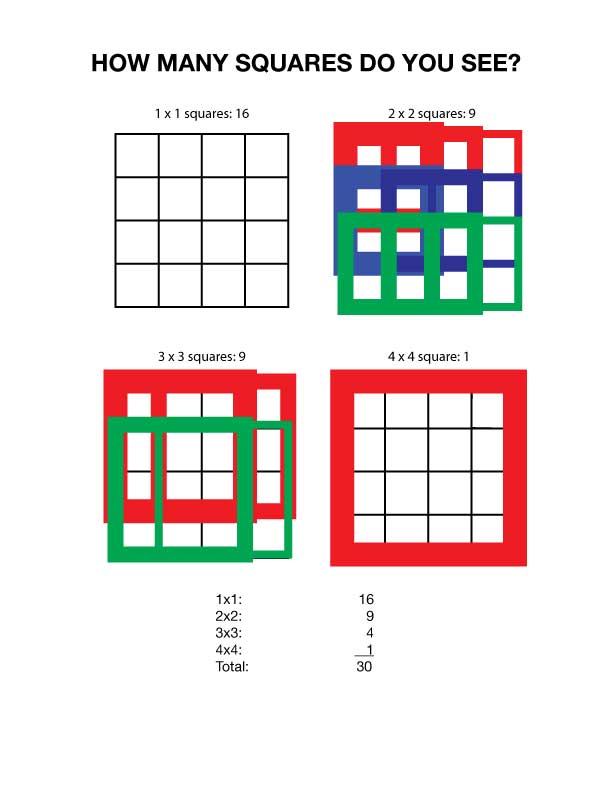
I typically pose this question at the beginning of every GRM23 class, and I’m usually met by a classroom of blank stares.
John McWade recently posed this question in his online magazine, Before and After, with some interesting responses.
Best 2D Animation B2D
Best 3D Animation B3D
Best Ceramics BC
Best Compositing Still Image BCSI
Best Design BD
Best Drawing ART BDRA
Best Educational Product BEP
Best Fiction Video BFV
Best Game BG
Best Greeting Card Design BGCD
Best Illustration BI
Best Journalism Multi-Media BJMM
Best Letterhead, Envelope and Business Card BLEBC
Best Logo Design BLD
Best Motion Graphics BMG
Best Multimedia Video BMV
Best Page Design BPD
Best Painting Art BPA
Best Personal Portfolio BPP
Best Photojournalism BP
Best Poster Design BPD
Best Printmaking BPM
Best Promotional Sales and Marketing BPSM
Best PSA BPSA
Best Typography BT
Best Video Ad BVA
Best Web Site BWS
Emerging Designer ED
Emerging Photographer EP
Frank Sardisco Scholarship FSS
Jim Sebek Scholarship JSS
Most Artistic Digital Image MADI
Most Humorous MH
Photography Department Scholarship PDS
Phyllis arnold scholarship PAS
Rookie of the Year 2D Design R2DD
Rookie of the Year 3D Design R3DD
Rookie of the Year Animation RA
Rookie of the Year Drafting RYD
Rookie of the Year Graphic Design RGD
Rookie of the Year Interior Design RYID
Rookie of the Year Journalism RJ
Rookie of the Year Photography RP
Rookie of the Year Video/Film RV
Rookie of the Year Web Design RWD
Submissions should be sent to me via email by May 1st
File size 1024 x 768 High Resolution JPEG #7 or higher
If possible use the file info dialogue box in Photoshop to add information to the submission
Title the files as follows
BC_student_name1_facultyName.JPG
BC stands for the category as indicated in the B column.
The student name is obvious, the 1 is used only if the student has more than 1 entry in the
showcase.
Also include your instructor’s name in the file name.
If you cannot use the Photoshop file information dialogue box …
you should attach a text document with the Name, Address, Phone Number
for the submitter.
Today we will begin our exploration of multiple page publications in InDesign.
Follow this tutorial to practice some of the tools used to set up a business card, Letterhead, #10 envelope
Pay careful attention to layout and design, typography, spelling, color specification, paper specification, presentation. Use your job sheet to specify all production details.
Exercise due April 2nd
Layout Workbook, pp. 52-71. Structure and Organization: Building Foundations.
Layout Workbook, pp. 72-87. The Integration of Visual Elements: Establishing Hierarchy.
Layout Workbook, pp. 88-115. Typography: Shaping the Page.
Scope of Project: Design and produce a set of four greeting cards with envelopes. The card size can be A2, which when folded is 4.25″ x 5.5″, A6 – 6 1/4″ x 4 5/8″, or A7 – 5″ x 7″. You must have printing on the front and the back of the cards…printing on the inside is optional. The cards should be folding cards.
Materials: Your choice, as long as you follow these instructions:
The illustrations from each of the four cards must be your own original artwork. Absolutely no stock images. Photos or artwork in the illustrations must be your own work.
The four cards must be related to each other. The way in which they relate is part of your design decision and creativity…they can relate by style, color palette, topic, typography or other graphic device.
While you must output your final cards in color, you can complete the cards and envelopes using your choice of materials, with the object being to develop and creatively present a set of four related original greeting cards with hand crafted envelopes.
Workflow: You may use Photoshop and Illustrator to prepare the greeting card images. Use Adobe InDesign to set up the file for print. Then export the InDesign file to Adobe Acrobat in press resolution for your final print output.
Steps for creating the greeting card layout in InDesign.
Seal Exercise
OBJECTIVES – The purpose of this exercise is to familiarize you with the following:
• Shape drawing tools
• Palette principles
• Offset paths
• Add anchor points
• Type Tool
• Text Formatting
• Layers
• Export to Photoshop
• Filters
Create a decal, label, seal, or patch that can later be printed and applied to:
Using a photo or illustration, digitally apply the “seal” to one of the above items.
I hope you all enjoyed this little exercise. If your answer is 30, you are right. Travis, if you still count 31, show us that last square!
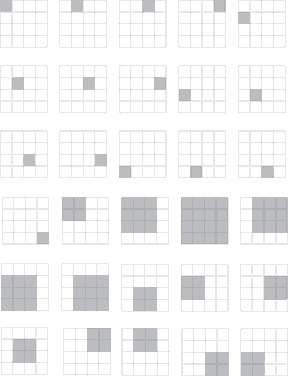
This solution is courtesy of Ben.